Product photography
How to Create Consistent Product Photo Crops
Product images look professional when the objects follow a repeatable visual system. The goal is not to make every object physically identical in size. It is to apply consistent rules for framing, baseline, whitespace, and output dimensions so shoppers can compare products comfortably.
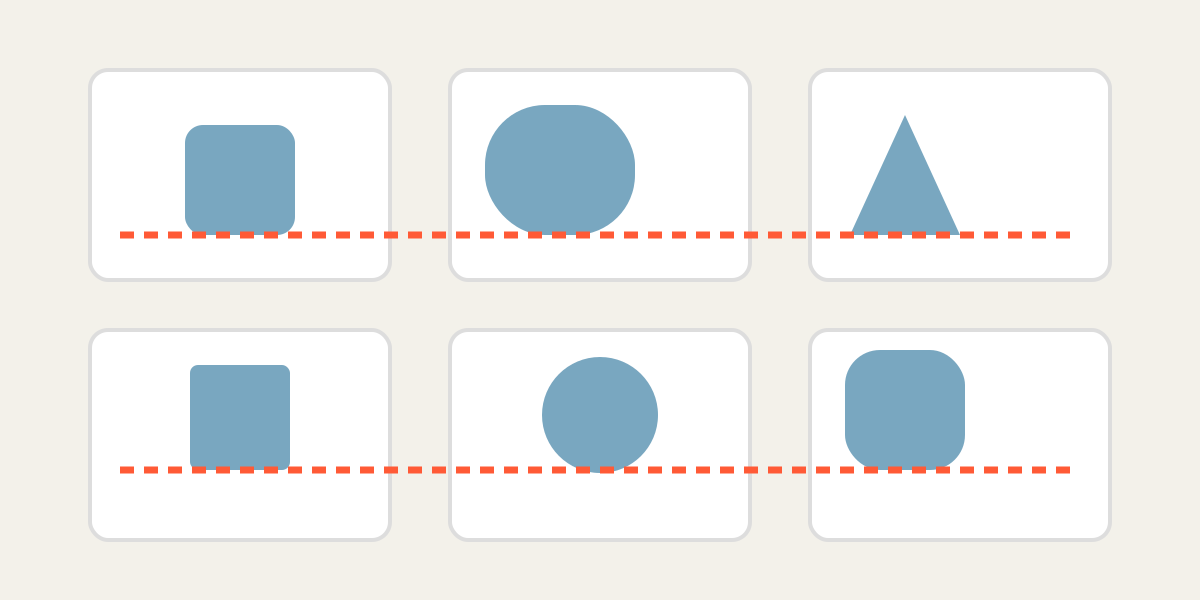
1. Define the catalog rule
Decide the background, ratio, subject scale, top margin, side margin, and baseline before cropping the first image. Write the rule down if several people will prepare the catalog.
A shared crop frame ensures identical file dimensions, while independent layer controls accommodate products photographed at different distances.
2. Choose a representative reference product
Use a medium-sized, clearly photographed product as the reference. Extremely tall, wide, or unusually shaped items can create a rule that works poorly for the rest of the catalog.
3. Align the baseline and visual center
For standing products, align the lowest contact point or packaging baseline. Then adjust the horizontal center. Products with asymmetric shapes may need optical centering rather than exact geometric centering.
4. Match scale without misrepresenting size
A consistent grid may use similar visual occupancy, but do not make a small item appear identical in physical scale to a large one when size comparison matters. Use captions or dimension graphics when necessary.
The crop should improve consistency without creating a misleading product impression.
5. Preserve whitespace and shadows
Keep similar breathing room around objects. Avoid clipping natural shadows unless the catalog style intentionally removes them. Transparent backgrounds should be tested over the actual site background.
6. Review as a complete grid
Export a small test set and place the files in the real product grid. Look for products that jump vertically, feel too crowded, or appear unusually small. Adjust the rule before processing the entire catalog.
| Element | Consistency target |
|---|---|
| Output dimensions | Identical for all files |
| Baseline | Same visual row |
| Top margin | Similar breathing room |
| Horizontal center | Optical center |
| Object scale | Comparable but not misleading |
| Background | Same color or transparent treatment |
Frequently asked questions
Should all products fill the same percentage of the frame?
Not always. Use a consistent visual rule while preserving meaningful size differences where relevant.
Can landscape and portrait originals be mixed?
Yes. Each source can be positioned independently inside the same output frame.
What ratio is best for product photos?
Use the ratio required by your marketplace or site design. Square and 4:5 layouts are common, but the destination specification should decide.
Can I keep transparent backgrounds?
Yes when the source format supports transparency, but test the final file on the intended background.
Overlay image crop editor
Upload your original and edited photos, lower the top image opacity, then align facial features or fixed background points. Every exported image uses the same crop ratio and pixel dimensions.
Start cropping