Portrait alignment
How to Match Face Position Across Multiple Photos
Portraits are especially sensitive to small alignment errors. When eyes move between frames or the face changes scale, a carousel or fade feels unstable. This method uses a few reliable landmarks instead of trying to force every facial outline to overlap.
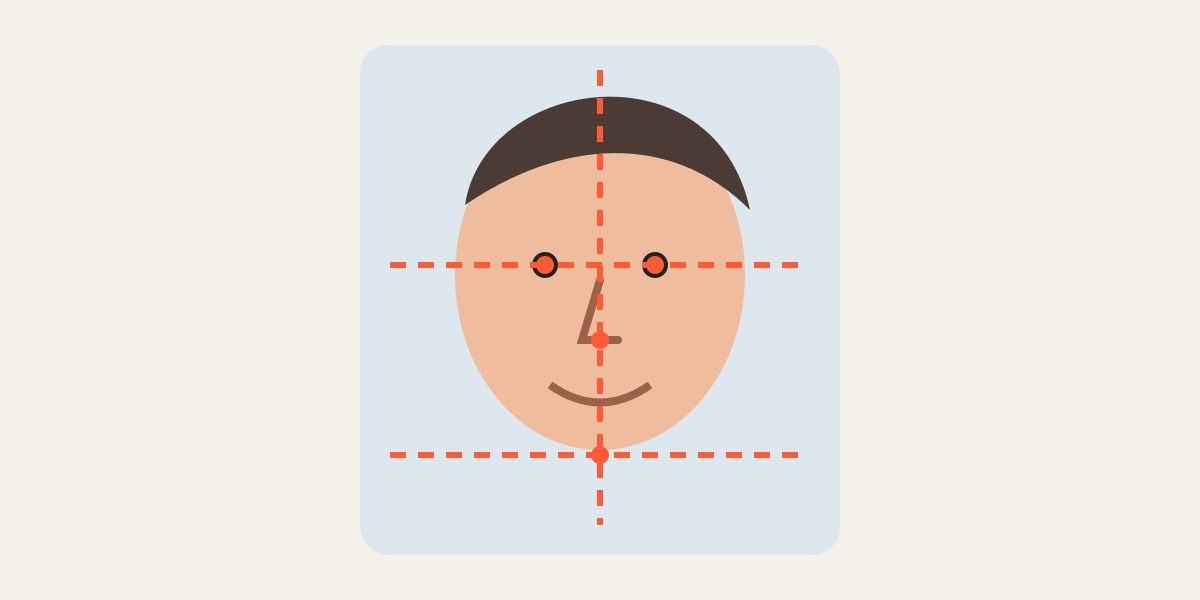
1. Start with the eye line
The eyes are usually the most stable visual anchor in a portrait. Align the pupils or inner eye corners horizontally before working on the rest of the face. A consistent eye line makes a sequence feel calm even when expressions change.
2. Match facial scale
Compare the eye-to-eye distance, face width, or distance from the eye line to the chin. If the eyes align but the chin remains too high or low, the scale is probably different. Adjust zoom before moving the image again.
3. Use the nose and ears as secondary checks
The nose bridge helps with vertical alignment, while ear position can reveal head rotation. Do not expect every landmark to overlap when the subject turned, smiled, or changed posture.
4. Preserve natural margins
Keep similar space above the hair and around the chin and shoulders. Avoid a tight crop on one image and generous space on another. Consistent margins often matter more than matching every contour.
5. Handle different expressions and poses
A smile changes cheek, mouth, and jaw outlines. Head tilt changes apparent eye height. In these cases, align the center of the face and the eye line, then accept real anatomical movement instead of distorting the crop.
6. Review at the final display size
A mismatch that looks dramatic at 400% zoom may be invisible in a normal profile card. Check the exported images at their real display size and switch between them quickly.
- Eye line remains stable
- Face scale feels consistent
- Headroom is similar
- Shoulders do not jump unnecessarily
- No hair, chin, or ears are accidentally clipped
Frequently asked questions
Should both eyes overlap perfectly?
Only when pose and perspective are similar. Prioritize the overall eye line and center of the face.
What if one photo is taken from closer range?
Reduce or increase that layer’s zoom until facial distances match the reference.
Can I use this for ID-style portraits?
Yes, provided the output follows the specific requirements of the organization receiving the image.
Why do ears not align when the eyes do?
The head angle or camera perspective probably changed. Do not force a false match.
Overlay image crop editor
Upload your original and edited photos, lower the top image opacity, then align facial features or fixed background points. Every exported image uses the same crop ratio and pixel dimensions.
Start cropping